


The License Upgrade feature lets customers move an existing WP Software License – PRO license from one product to another, such as from a Basic edition to a Pro edition. It is designed for normal WooCommerce orders.
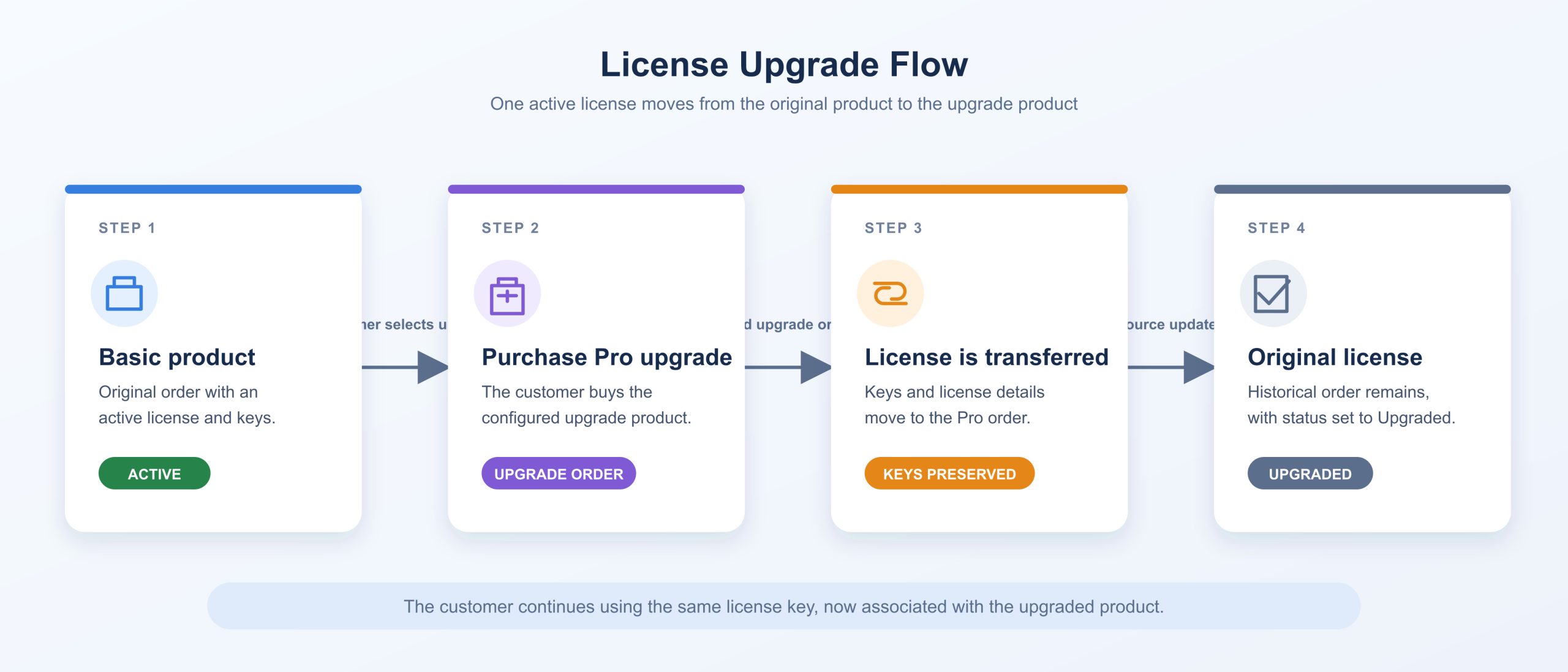
Instead of creating a second unrelated license, the upgrade process transfers the customer’s existing license keys and relevant license information to the newly purchased product. The original license is then marked as Upgraded, preserving a clear history of where the license came from and where it was moved.
Table of Contents
- How License Upgrades Work
- Configuring an Upgrade Product
- What Happens When an Upgrade Is Purchased
- License Groups and Upgrade Behaviour
- Expiry Date Options
- Important Requirements and Limitations
- Order History and Administration
How License Upgrades Work
A license upgrade is configured on the new, higher-tier product. For example, you may sell “Product Basic” and “Product Pro.” The Pro product can be configured to accept licenses previously purchased with the Basic product.
When a logged-in customer purchases the upgrade product, the plugin checks whether they own an eligible active license for one of the configured source products. Once the upgrade order reaches a paid status, the plugin transfers the license to the upgrade order item.
The customer keeps their existing license keys. This is important because it avoids requiring them to update their installed software, activation settings, or stored license key after upgrading.
The original order item is marked with the Upgraded license status. The new order item becomes the active location of the license.
Configuring an Upgrade Product
To configure an upgrade, edit the product that customers will purchase as the destination product—for example, your Pro or Premium edition.
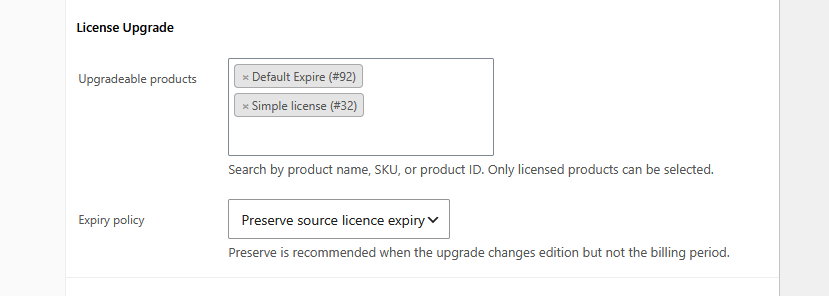
In the product’s License settings, locate the License Upgrade section. The Upgradeable products field defines which existing products are eligible to be upgraded into this product.
Use the searchable product selector to find source products by product name, SKU, or product ID. The selected product IDs are stored internally by the plugin, but the administrator sees readable product names in the field.
Only products that are configured as licensed products should be selected. A customer can only upgrade a license that is both associated with one of these products and currently active.
A product should not be configured as its own upgrade source. This would create an invalid circular upgrade path and provides no meaningful benefit to the customer.
What Happens When an Upgrade Is Purchased
During checkout, the plugin identifies the customer’s eligible source license. The upgrade is linked to that original order item before payment is completed.
After the upgrade order is paid:
- The license keys are moved from the old order item to the new order item.
- The new order item is set to an active license status.
- The original order item is set to the Upgraded status.
- The original order item records a link to the new upgrade order.
- The new order item stores a record of the source order and source order item.
- Order notes are added to both orders so administrators can follow the upgrade history.
The customer therefore has one active license, not two independently usable licenses. The old order remains available as a historical purchase record, but it should no longer be used to manage or regenerate license keys.
License Groups and Upgrade Behaviour
License groups do not need to have matching names between the original product and the upgrade product.
For example, the original product may use a group named “Basic License,” while the upgrade product may use a group named “Professional Access.” The upgrade still works because the source group title is not used to decide whether the license can be migrated.
The upgrade process transfers the source license into the first license group configured on the upgrade product. This means the destination product may contain additional groups without preventing an upgrade from a product that contains only one license group.
This behaviour is intentionally simple and predictable:
- The source product must contain exactly one license group.
- The upgrade product must contain at least one license group.
- The first group on the upgrade product receives the migrated license keys.
- Group names do not need to match.
If the source product has multiple license groups, the upgrade is not applied. Mapping several old groups into one new group would make it unclear how the license should be restored if the upgrade order is later refunded or cancelled.
Expiry Date Options
The Expiry policy controls how the license expiry is handled after the upgrade.
Choose Preserve source license expiry when the upgrade changes the product edition but should not extend the customer’s existing entitlement period. This is usually the preferred setting for a Basic-to-Pro upgrade.
Choose Use the new product expiry when purchasing the upgrade should start a new license period according to the upgrade product’s own license configuration.
Important Requirements and Limitations
License upgrades support regular WooCommerce products and regular WooCommerce orders only. Subscription products and subscription orders are excluded from the upgrade process.
The customer must be logged in, because the plugin uses the WooCommerce customer account to find their previous license. The source license must be active and must not already have been upgraded.
An upgrade order should contain one upgrade item per source license. This prevents a single source license from being transferred more than once in the same checkout.
If an upgrade order is later refunded, cancelled, or fails after the migration has occurred, the plugin can reverse the upgrade. The license keys and saved license information are returned to the original order item, restoring the previous license state.
Order History and Administration
The original order remains visible in WooCommerce, but its license status is Upgraded. This status indicates that the license was transferred and should no longer be treated as independently active.
Administrators can use the order notes and upgrade metadata to trace the relationship between the old and new orders. This provides a clear audit trail for support requests, refunds, and customer account questions.
Category: News